Building an ESP32 Gree AC IR Remote with Custom PCB and Web UI
A little story about why I built a Wi-Fi Gree AC remote with an ESP32, a custom PCB and a browser UI — and what I learned trying to make it feel like a finished product.
Why I even started this
Our Gree AC remote disappeared mid-summer. I looked everywhere. It is still missing. Instead of buying another one, I figured I would just build my own, because honestly I had been waiting for an excuse to mess with IR and ESP32 for a while.
The idea was simple at first: a small box near the AC that listens to Wi-Fi and shoots out the right IR codes. But anyone who has used a Gree remote knows it is not a stateless device — it carries a full state (temperature, mode, fan, swing, sleep, display, turbo, eco, the lot) and ships that state every press. So the project quickly turned into "rebuild the remote, but on an ESP32, with a browser UI".
What is on the board
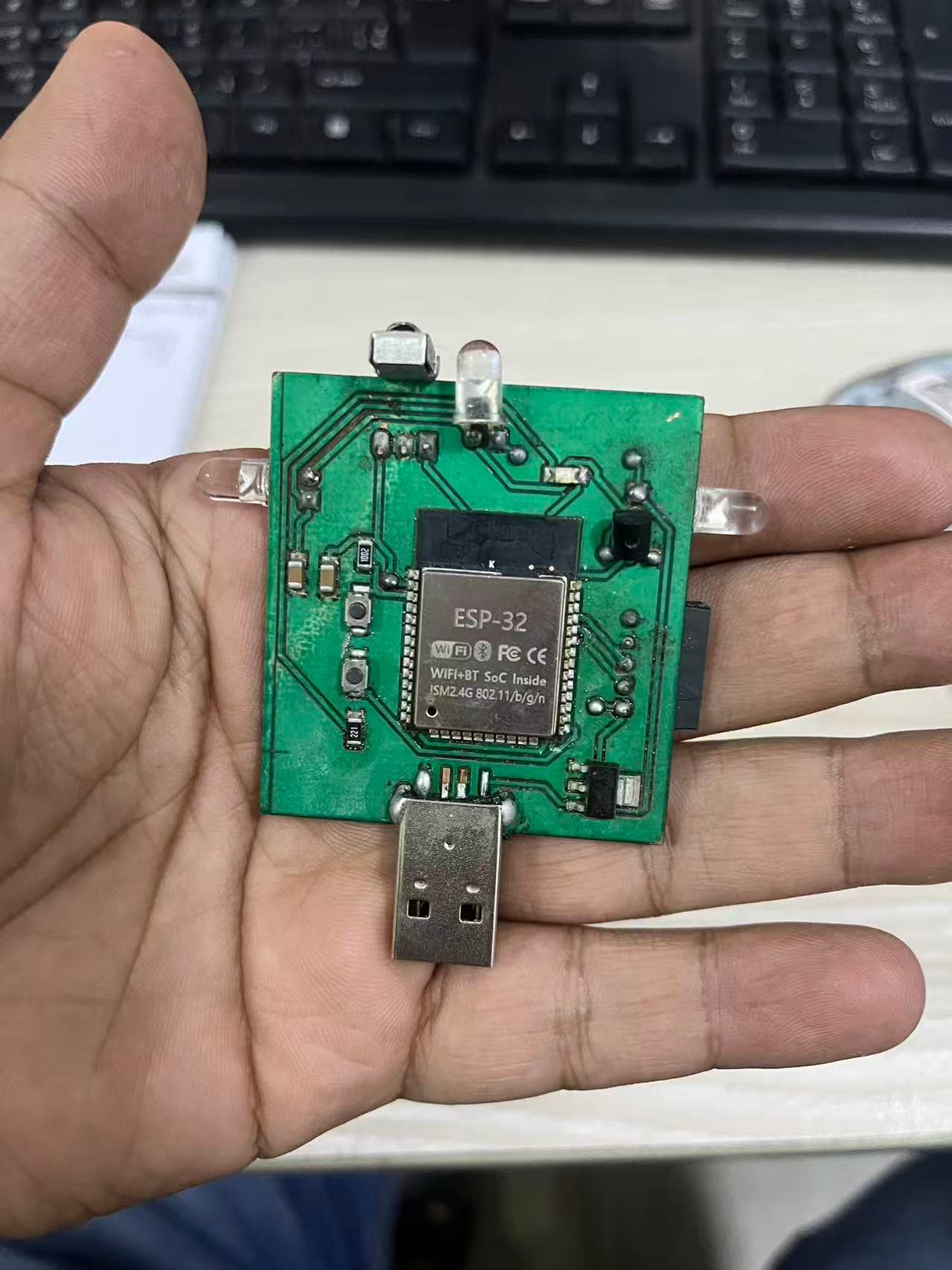
I used an ESP32-WROOM-32 as the brain, a few IR LEDs for transmission, an IR receiver for testing, a couple of tactile buttons and some status LEDs. The board powers off USB and has a 3.3V regulator on it.
I designed the PCB from scratch in EasyEDA. I always go through the 3D preview a few times before sending anything to fabrication — that step has saved me so many times. You can spot a connector facing the wrong way, an LED hiding under a header, a USB hole too close to the edge, all before any copper is etched.
The firmware and the web UI
The firmware hosts a small web page on the local network. I tried to make the page actually look like a Gree remote instead of a generic button grid, because I wanted it to feel like the thing it was replacing.
Internally, it is a state machine. Every UI button updates the local state, then the firmware encodes that full state into the right IR frame and blinks it out the IR LED.
What was actually hard
Getting an IR LED to blink is trivial. The hard part was making the whole thing feel like a real product:
- Matching Gree's frame format properly so the AC actually obeys.
- Squeezing all of that onto a board that is still compact and tidy.
- Pointing the IR output in the right direction so the AC sees the signal even from across the room.
- Designing a web UI that anyone in the house can use without instructions.
The other lesson is more cultural: in a lot of homes here, "install this app" is a non-starter. A simple local web page that anyone on the Wi-Fi can open is so much friendlier for a prototype.
What it does now
The current build has a working PCB, an assembled board, an IR test module, and a Gree-style browser remote on the local network. It is the kind of thing I can hand to a friend and they can use it without me explaining anything.
Where I want to take it
- Saved schedules and timers
- MQTT so Home Assistant can talk to it
- A small printed enclosure so it stops looking like a bare board
- IR decoding to confirm the AC actually obeyed each command
This project is a good reminder of how I like building things: start from something annoying in daily life, build the electronics, make the interface human, and then keep improving the reliability piece by piece.